Creating a Developer Console in Twine
Some coding and designing tips for working with Twine. Very simple, very effective.
It feels a little gauche to be delivering pro tips for game development when I'm a neophyte, but I've come across a helpful approach that I'll be revisiting for the foreseeable future, and I'd like to share it.
When you start a story, tweaking variables and passages is fairly straightforward, but as it becomes both longer and more complex, it gets awkward and difficult, really slowing you down. The feedback loop becomes over-extended and it affects both productivity and creativity (though there's nothing wrong with a *little* bit of space between actions).
To smooth the way a little bit, and to make keeping track of variables easier, I realised that it should be possible to silently call two passages that would make tweaking easier.
The first one is the Master Variable List. This is a list of every variable, set to its default initialised state. When I was writing the game as part of a recent game jam, I would instantiate as I went, but this is messy and undesirable for a few reasons. It especially makes tweaking and debugging agonisingly difficult as the game starts to sprawl.
Instead, I've created a master list of all of the variables used in the game and have them listed in a passage called the Master Variable List, it looks something like this:
- Tweak this for different outcomes.
Confidence: <<set $confidence = 20>>
- This first comes into play in [[Out1]].
Orientation: <<set $pref = straight>>
- Woman is changed to Lady in [[Intro3]]
Gender: <<set $sex = man>>
- This is used to limit the cycles of the mirror shot.
Disgust: <<set $disgust = 6>>

etc.
This is called just once, silently, in the Start passage with the <<silently>> tags.
<<silently>>
<<display 'Master Variable List'>>
<<endsilently>>
This isn't really a performance issue, I've never heard of a Twine game being so complex that it significantly taxed the system it was running on, but it's definitely a development performance issue. Every single variable is available in one passage I keep open as I write. If I need to add a new variable I instantiate in that passage with a note on its usage. It's changed how I write, and the next time I start a story from scratch, I'll be doing it this way.
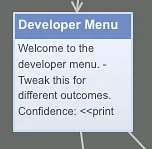
The other big change to my working method is the Developer Menu. Every now and then, I'll take a bunch of the newest variables added to the Master Variable List and copy and paste them into the Developer Menu, but this time instead of instantiating, the variables are displayed and a text box is offered to allow alteration.
Before going any further, I should say that I haven't got the tweaking side of this menu working yet, so that may not be practical, but at the very least it would make debugging much, much easier if you could see a readout of all of your variables as you played to track how they're being changed by your decisions and the actions of the game itself.
With that proviso, I alter the pasted variable declarations from something like this:
- Tweak this for different outcomes.
Confidence: <<set $confidence = 20>>
To this:
- Tweak this for different outcomes (Integer).
Confidence: <<print $confidence>>
Set to: <<textinput $confidence>>
That's pretty much it! To make switching it on and off easier, I have a passage called Developer Visibility that silently calls the Developer Console:
<<silently>>
<<display 'Developer Console'>>
<<endsilently>>
Then you just need to paste this into every passage:
<<display 'Developer Visibility'>>
This does nothing at first since you're calling an ostensibly empty passage, but if you decide you want to play with the console switched on, you just go to the Developer Visibility passage and remove the <<silently>><<endsilently>> tags. Your console should be visible on every page after that. Put the tags back and it disappears again.